
Best Practices for CRM and Payment Processor Integration
Sync donor payments with your CRM to reduce errors, automate reconciliation, boost retention, and maintain PCI-compliant security.

Managing donations and donor relationships across separate systems can waste time and lead to errors. By connecting your CRM with a payment processor, you can:
- Automatically sync donor and payment data in real-time.
- Reduce manual tasks like data entry and reconciliation.
- Improve donor retention with predictive analytics and personalized outreach and automated thank-you messages.
- Ensure accurate financial tracking and compliance with IRS requirements.
- Support modern payment preferences like digital wallets, which are projected to handle 54% of online transactions by 2026.
Key benefits include streamlined workflows, reduced errors, and better donor insights. Integration also helps nonprofits retain up to 30% more revenue by automating processes and identifying failed payments early.
To get started, focus on systems with strong APIs, secure data handling (PCI DSS compliance), and ease of use. Automate syncing, standardize data mapping, and choose tools that support diverse payment methods like ACH transfers and digital wallets for lower fees and higher reliability.
Quick Tip: Test integrations thoroughly using sample records, monitor sync logs regularly, and prioritize security measures like encryption and two-factor authentication.
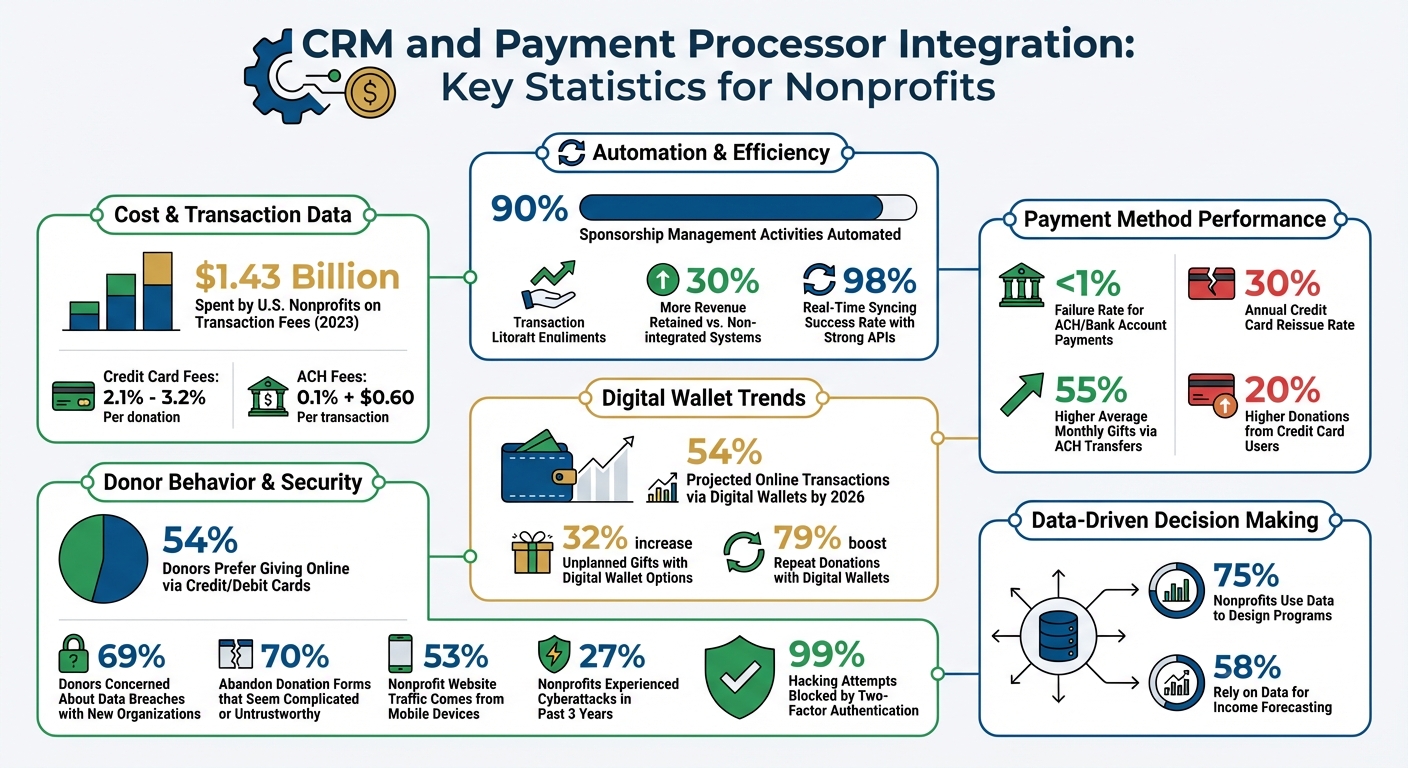
CRM Payment Integration Benefits: Key Statistics for Nonprofits
Sage Intacct Advanced CRM Integration for Nonprofits
Why Nonprofits Should Integrate CRM with Payment Processors
Connecting your CRM with a payment processor streamlines operations and eliminates tedious manual tasks. This integration can automate up to 90% of sponsorship management activities, such as sending receipts, thank-you messages, and year-end tax summaries. With these processes handled automatically, your team can dedicate more time to building stronger donor relationships. Plus, this automation strengthens recurring donation management, making it easier to maintain consistent support.
For child sponsorship programs, integration simplifies recurring donations by instantly updating donor records, sending personalized thank-you notes, and flagging any issues. Nonprofits using integrated payment solutions have been shown to retain up to 30% more revenue compared to those relying on non-integrated systems. Automated alerts also help identify failed transactions early, ensuring donors remain engaged and contributions continue uninterrupted.
A direct flow of payment data means real-time reconciliation, which reduces the need for manual data transfers and minimizes errors - critical for producing IRS-compliant receipts and meeting state registration requirements. In 2023, U.S. nonprofits spent an estimated $1.43 billion on transaction fees, highlighting the importance of accurate financial tracking to manage these costs effectively.
Beyond reducing errors, integrating data unlocks better fundraising strategies. Centralizing sponsorship and payment information allows nonprofits to make more informed decisions. For instance, 75% of nonprofits use data to design programs, while 58% rely on it for income forecasting. A unified system helps identify committed sponsors, analyze payment methods with lower failure rates (such as bank accounts with less than 1% failure compared to 30% for credit cards), and fine-tune donor retention strategies.
Lastly, integration ensures nonprofits stay aligned with evolving donor preferences. With digital wallets projected to account for 54% of transactions by 2026, it's essential for systems to automatically capture and sync payment updates - like a donor switching from a credit card to Apple Pay - across their profiles. This adaptability keeps donor information accurate and ensures smooth transactions.
How to Choose CRMs and Payment Processors
Picking the right CRM and payment processor starts with compatibility. Systems with strong APIs or webhooks are essential, offering real-time syncing with a success rate of 98%. Without this connection, you’re stuck with manual data entry - and all the errors that come with it.
Another key factor is data mapping capabilities. Your CRM should allow precise field matching between systems. For instance, linking "transaction_amount" in your payment gateway to "deal_value" in your CRM ensures data flows correctly without blank fields or mismatches.
Security is non-negotiable. With 69% of donors expressing concerns about data breaches when donating to new organizations, your system must support PCI DSS 4.0 compliance, tokenization, and encryption to protect sensitive information.
Ease of use is equally important. A complicated system can lead to frustration and underutilization. Request demos and have your team - the ones who will use the system daily - test it to catch usability issues early.
Lastly, your integration should support a variety of payment methods. Over half of donors (54%) prefer to give online via credit or debit cards, and digital wallets are expected to handle 54% of all online transactions by 2026. Offering options like credit cards, ACH transfers (with fees as low as 0.1% + $0.60), and digital wallets like Apple Pay, Google Pay, and Venmo gives donors flexibility while keeping transaction costs low.
Compatibility and User Interface
A strong technical connection ensures smooth communication between your CRM and payment processor. Look for systems with ready-made connectors or well-documented APIs for real-time data syncing across your website, CRM, and payment gateway.
"Integration fixes these headaches by connecting your systems automatically. When someone processes a payment... that data instantly appears in your CRM." - Andrew Cares, Co-founder, Centrobill
The user interface is just as crucial. Your payment forms should match your website’s branding - colors, fonts, and overall design. If the processor looks out of place, donors might worry they’ve been redirected to an unsafe site. This fear causes 70% of donors to abandon donation forms that seem complicated or untrustworthy.
Opt for website forms that integrate fully with your CRM to provide a seamless experience. Since mobile devices now account for 53% of nonprofit website traffic, it’s vital that your integration supports mobile-responsive forms and tap-to-pay options. Additionally, the system should offer easy-to-read, downloadable reports for financial reconciliation. Your team shouldn’t need a developer to pull donation data or update donor profiles.
Decide whether you need one-way or two-way sync. One-way sync pushes payment data to your CRM, which is simpler and safer for most organizations. Two-way sync, while more complex, keeps systems perfectly aligned - for example, if a donor updates their email in the CRM, it reflects in the payment gateway, and vice versa. However, this requires stricter rules to avoid data conflicts. For most nonprofits, one-way sync is sufficient.
HelpYouSponsor Payment Gateway Integration
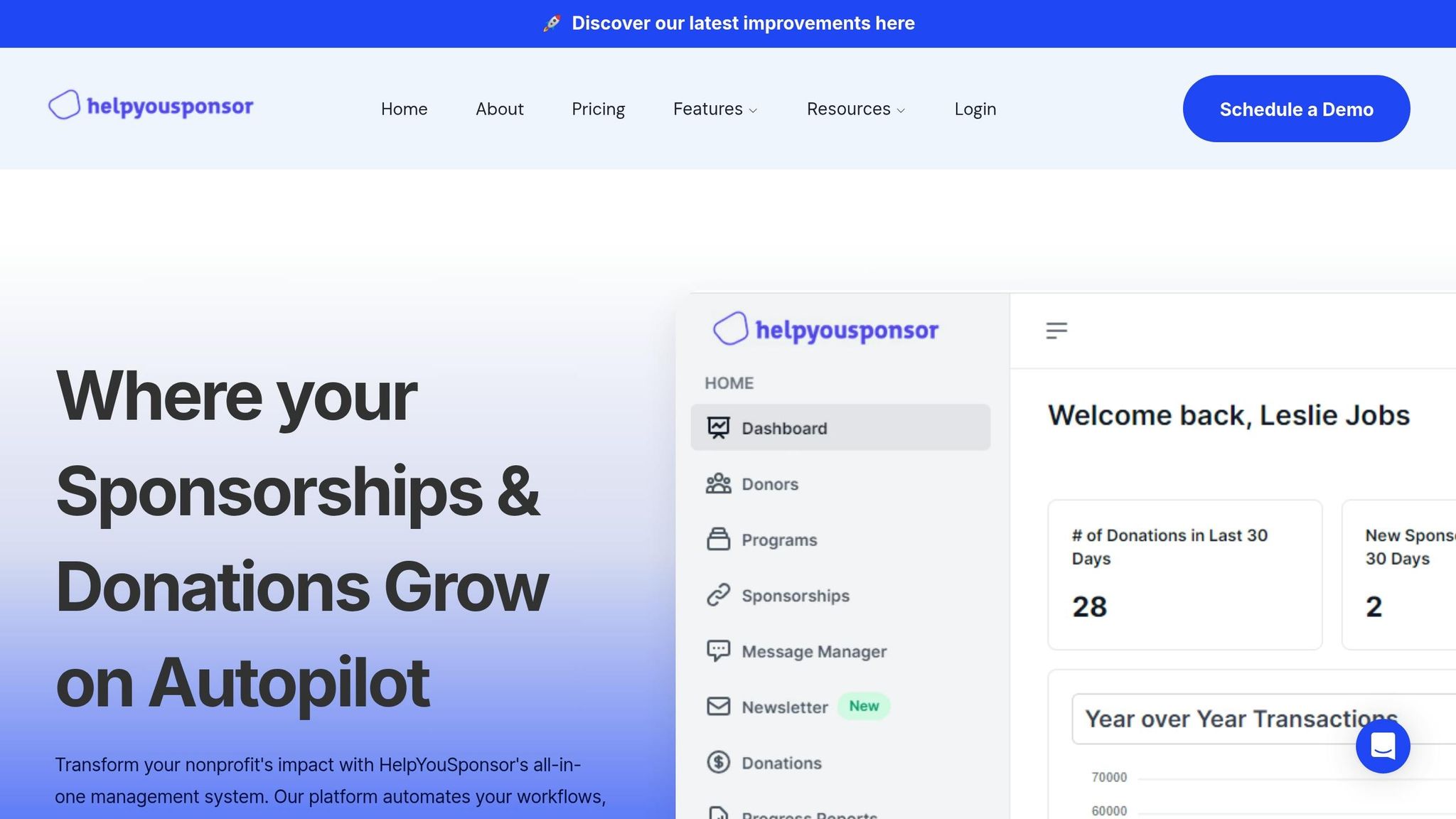
Once you’ve nailed down your technical and interface needs, consider specialized tools like HelpYouSponsor. This platform is tailored for sponsorship and fundraising programs, offering built-in payment gateway integration that simplifies donation management. It connects with multiple payment gateways, automatically tracks transactions, and updates donor records without manual input.
HelpYouSponsor supports various payment methods, including credit cards, debit cards, ACH transfers, and digital wallets. Since ACH transfers fail less than 1% of the time compared to credit cards, offering bank transfers can improve the reliability of recurring donations. The system also syncs donor payment preferences across profiles, keeping records accurate.
Security is a top priority, with PCI-compliant processing and tokenization safeguarding donor data. Automated receipts and thank-you messages are generated after each transaction, streamlining routine tasks.
The platform offers scalable pricing based on your organization’s size. The Free Plan supports up to 10 commitments per month, ideal for small organizations starting out. The Pro Plan, at $50/month, handles up to 63 commitments monthly, while the Max Plan charges $0.80 per commitment for larger programs. This usage-based model ensures you only pay for what you use, making it accessible for nonprofits of all sizes.
Best Practices for CRM and Payment Processor Integration
Integrating your CRM with your payment processor requires thoughtful preparation. Start by documenting all your current data sources - like databases, spreadsheets, and accounting software - and establish clear goals. For example, aim to cut down on manual data entry or improve the accuracy of monthly reporting. Before moving any data, clean it up by removing duplicates. Once your data is organized, follow these steps to ensure a smooth integration process.
Standardize Data Mapping
Data mapping is the backbone of seamless communication between your systems. It ensures that data flows correctly, maintaining unified donor records. Align fields between your payment processor and CRM so that information lands where it should. For instance, map "transaction_amount" from your payment processor to "deal_value" in your CRM to avoid blank fields or mismatched records.
Use unique identifiers like email addresses or IDs to match records instead of relying on names alone. This helps avoid duplicate profiles for the same person - like "John Smith" and "J. Smith." Standardize formats for names, dates (MM/DD/YYYY), currency ($1,500.00), and phone numbers across all records. Additionally, create custom fields for processor-specific details, such as decline codes or transaction IDs. These fields are particularly helpful when troubleshooting failed payments, ensuring every transaction is logged accurately without manual fixes.
Automate Data Syncing and Updates
Once your data mapping is complete, automate the syncing process for accuracy and efficiency. Manual data entry is prone to errors, and with 88% of data breaches tied to internal mistakes, automation not only speeds things up but also enhances security. Use webhooks to trigger real-time updates from your payment processor to your CRM whenever a transaction occurs. This ensures donations are reflected in your system without delays.
"Integration fixes these headaches by connecting your systems automatically. Eliminate manual entry and prevent update delays." - Andrew Cares, Co-founder, Centrobill
Set up automation rules to "find or create" records - this way, the system checks for an existing donor by email before creating a new entry. This prevents duplicate records when donors contribute multiple times. During busy fundraising periods, schedule data syncs every 15–30 minutes, while hourly updates work well for regular operations. Use service accounts for integrations instead of individual staff logins, ensuring continuity even when team members change. Regularly monitor sync logs, aiming for a 98% success rate. If your success rate dips below this, it’s a sign your configuration needs attention.
Maintain Security and PCI Compliance
While ensuring accurate, real-time data, it’s equally important to protect donor information with robust security measures. Many small nonprofits qualify for the simpler Self-Assessment Questionnaire (SAQ) A under PCI DSS compliance, typically costing less than $500 annually. A key rule: never store full credit card numbers on your servers. Instead, rely on the payment tokens provided by your processor.
Enable two-factor authentication (2FA) on all systems handling donor data - Microsoft reports this blocks 99% of hacking attempts. Rotate API keys and credentials every quarter or immediately if an administrator leaves. Use bank-grade encryption for data both in transit and at rest, and implement role-based access controls to limit data access to only what’s necessary for each staff member. With 27% of nonprofits reporting cyberattacks in the past three years, these precautions are essential. Before going live, back up your data and test the system with 100–200 sample records, including successful payments, failures, refunds, and recurring donations.
Common Integration Problems and How to Fix Them
Even with the best plans in place, nonprofits often face some recurring integration issues. One major hurdle? Data incompatibility. For example, your payment gateway might label a field as "transaction_amount", but your CRM expects it to be "deal_value" instead. Add mismatched field types - like trying to input dates into text fields - or character limits into the mix, and you’ve got a recipe for blocked data transfers. To tackle this, create a data dictionary using the "Four-Column Rule." This means documenting the Source Field, Destination Field, Field Type, and Transformation Logic. Before rolling out the integration, run a "10-Record Test" to manually sync a small batch of data and ensure everything is landing where it should. Middleware tools like Zapier or Make can also help by converting data formats on the fly, easing compatibility headaches before you move on to reconciliation challenges.
Manual transaction reconciliation is another common pain point. Without automation, staff can spend hours cross-checking donation records, and traditional invoices often take 20–30 days to process. The fix? Webhooks. These send real-time alerts from your payment gateway to your CRM - think of it as an instant notification like, "Donor X just paid $Y" - removing the need for manual updates. To stay on top of things, schedule quick weekly log audits to catch sync errors early. Also, run monthly random checks on 10 transactions to confirm refunds and chargebacks are properly logged across all systems. For accounting software that doesn’t directly connect to your CRM, middleware can step in to automate the data flow.
"The simplest way to bridge the gap between your fundraising and accounting data is with integrated CRM accounting software." - Ally Orlando, Communications Professional, DonorPerfect
Lastly, limited technical resources can make integration seem daunting. But it doesn’t have to be. Start by selecting systems with built-in, ready-to-use connections that don’t require coding. For any gaps, no-code tools like Zapier offer an easy drag-and-drop interface. Payment processors like PayPal or Stripe are quicker to set up than traditional merchant accounts, and hosted payment pages can significantly reduce your PCI compliance workload. Take it one step at a time - begin with integrating your donation form, then expand as your team gains confidence. Always test in a sandbox environment before working with live donor data, and create simple visual guides to document workflows. This ensures the knowledge stays within your organization, even if staff turnover occurs.
How to Improve Workflows After Integration
After a successful system integration, refining workflows through smarter reporting and offering diverse payment options can significantly amplify the impact of donor contributions.
Automated Reporting and Donor Insights
With your CRM and payment processor working together, you can say goodbye to manual spreadsheets. Integrated systems automatically track key metrics like Monthly Recurring Revenue (MRR), Customer Lifetime Value (CLTV), and Average Transaction Value (ATV) - no manual calculations required. This means you gain access to real-time revenue forecasts and can easily identify key donor trends.
The real game-changer is predictive analytics. Advanced integration tools can flag potential payment failures before they even occur and recommend the best times to retry declined payments. This ensures your recurring revenue remains steady without the need for staff to chase down failed transactions. Plus, automated alerts will immediately notify your team of any sync issues, so you don’t have to rely on manual audits to uncover missing donations.
These automated tools not only save time but also provide a solid foundation for enhancing donor payment experiences.
Accept Multiple Payment Methods
Once your reporting is streamlined, expanding payment options can take donor engagement to the next level. Offering donors their preferred payment method isn’t just about convenience - it can directly influence donation amounts. For example, credit card users tend to donate 20% more than those using other methods. Meanwhile, donors who opt for ACH transfers contribute 55% higher average monthly gifts.
The rise of digital wallets is another opportunity. By 2026, 54% of online transactions are expected to be handled by digital wallets. Nonprofits that include digital wallet options see a 32% increase in unplanned gifts and a 79% boost in repeat donations.
Cost efficiency is another factor to consider. Credit card processing fees range between 2.1% and 3.2% per donation, while ACH fees are significantly lower - often just 0.1% plus $0.60 per transaction. For recurring donations, ACH not only saves money but is also more reliable, with bank accounts failing less than 1% of the time, compared to the 30% annual reissue rate for credit cards.
Conclusion
Connecting your CRM with payment processors streamlines operations by cutting out tedious manual tasks. When donation data syncs directly into your CRM, you avoid duplicate records and free up your team to focus on strengthening donor relationships instead of data entry chores. For finance teams, automated transaction settlement can save countless hours during monthly reporting and accounting processes.
On top of operational improvements, security and compliance take a leap forward. Tokenized and encrypted donor data helps shield your organization from potential reputational and financial harm. This is critical, especially considering that 27% of nonprofits have experienced cyberattacks, and 68% have dealt with data breaches within the past three years.
HelpYouSponsor simplifies this process by supporting integrations with widely used payment gateways and offering guided field mapping to make data migration easier. It also connects seamlessly with QuickBooks for automated financial reporting and works with over 1,000 apps via Zapier - all accessible from a single dashboard.
FAQs
Should my CRM and payment processor use one-way or two-way sync?
When connecting your CRM with a payment processor, a two-way sync is typically the way to go. Why? It keeps both systems updated automatically, cutting down on manual data entry and minimizing errors. This ensures your records stay accurate and up to date.
On the other hand, a one-way sync might seem simpler, but it only updates data in one direction. This can lead to mismatched information between systems, which can be a real headache. For nonprofits handling donations and donor information, a two-way sync is especially useful. It ensures real-time updates, making workflows smoother and data more reliable.
What donor data should never be stored in my CRM for PCI compliance?
For PCI compliance, it’s critical to avoid storing sensitive donor data such as credit card numbers, CVV codes, or full magnetic stripe data in your CRM. Keeping this information not only heightens the risk of data breaches but also violates PCI DSS standards, which are designed to safeguard donor information effectively.
How can I avoid duplicate donor records when syncing donations?
To keep donor records clean and avoid duplicates during donation syncs, it's essential to set up a unique identifier for each donor. This could be something like their email address or a combination of their name and phone number. Along with this, applying field-level matching rules helps distinguish between new and existing records. Incorporating deduplication logic into your integration is also key. This ensures incoming data is compared against existing records, allowing duplicates to be merged or updated, which leads to more accurate and reliable data.